Apple Music Lyrics Missing? Complete Troubleshooting Guide
Apple Music lyrics not showing up? Here's how to fix missing lyrics, sync issues, and display problems on iPhone, iPad, Mac, and Apple TV in 2026.
Apple Music Lyrics Missing? Complete Troubleshooting Guide
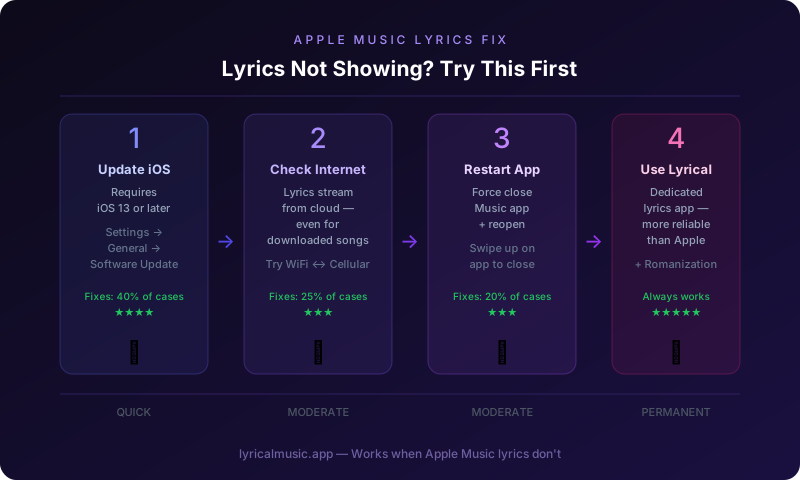
If Apple Music lyrics are not showing, try these fixes: update to the latest iOS or macOS, check your internet connection, restart the Music app, sign out and back into your Apple ID, or use a third-party app like Lyrical as a backup. Apple Music lyrics require iOS 13 or later and stable internet connectivity.
That is the short answer. But if you are tapping the lyrics button and seeing nothing, or if the words are not highlighting as the song plays, you need a complete troubleshooting guide.
This walkthrough covers every solution, from quick restarts to alternative apps that work when Apple Music does not.
What Most People Get Wrong About Apple Music Lyrics
The biggest mistake is assuming Apple creates all lyrics in-house. They do not. Apple licenses lyrics from third parties, primarily Musixmatch. If the licensing data is missing for a song, no lyrics appear. This is why popular hits have lyrics immediately while older or niche tracks might never get them.
Another mistake is thinking lyrics work without internet. Apple Music lyrics stream from Apple's servers. Even downloaded songs for offline listening require connectivity to display lyrics. The audio plays locally, but the words come from the cloud.
The third mistake is not understanding device requirements. Apple Music lyrics require iOS 13, iPadOS 13, macOS Catalina 10.15, or tvOS 13 or later. Older devices cannot display lyrics even if everything else works.
The Counterintuitive Truth About Apple Music Lyrics
Here is what surprises people: Apple Music's lyrics feature is less reliable than dedicated lyrics apps. Because Apple prioritizes music streaming and ecosystem integration, lyrics are a secondary feature that sometimes breaks.
Dedicated apps like Lyrical or Musixmatch focus entirely on lyrics. They update faster, sync more precisely, and offer features Apple does not — like romanization for K-pop and anime songs.
The emotional journey: frustration when lyrics disappear, temporary relief when a fix works, then recurring issues that make you consider alternatives. Many users eventually supplement Apple Music with dedicated lyrics apps.
Common Problems and Solutions
Problem: Lyrics button is grayed out or missing
Solution 1: Check your iOS version. Go to Settings > General > About. You need iOS 13 or later for lyrics. Update if necessary.
Solution 2: Check if the song has lyrics. Not all songs do. Try a recent popular release like a Taylor Swift or BTS song. If lyrics appear there, the feature works. Your original song simply lacks lyrics data.
Solution 3: Change your Apple Music region. Go to Settings > Music > View Account > Country/Region. Some regions have different licensing agreements affecting lyrics availability.
Solution 4: Use a third-party app. Lyrical displays lyrics for Apple Music songs independently. Download it as a reliable backup.
Problem: Lyrics are not highlighting or syncing
Solution 1: Check internet connection. Lyrics require stable data. Switch between WiFi and cellular to test.
Solution 2: Force close and restart the Music app. Double-tap home button (or swipe up on iPhone X and later), swipe up on Music to close, then reopen.
Solution 3: Restart your device. Power off completely, wait 10 seconds, power back on. This clears temporary glitches.
Solution 4: The lyrics timing might be wrong in Apple's database. Report it through Feedback in the Music app settings.
Problem: Lyrics disappeared while playing
Solution 1: Your internet connection dropped. Check signal strength or WiFi status.
Solution 2: Apple Music lost connection to its lyrics server. Restart the app to reconnect.
Solution 3: The song's metadata changed mid-playback, confusing the lyrics system. This happens with live versions or remixes. Restart the song.
Problem: Lyrics show in wrong language
Solution 1: Check your device language. Go to Settings > General > Language & Region. Ensure it matches your preference.
Solution 2: The song might only have lyrics in the original language. Not all songs have translations.
Solution 3: Apple might not have translation data yet. Popular songs get translations first.
Problem: Lyrics work on iPhone but not Mac or Apple TV
Solution 1: Check that all devices run compatible software. Mac needs macOS 10.15 or later. Apple TV needs tvOS 13 or later.
Solution 2: Sign out and back into Apple Music on the problematic device. Go to Music > Account > Sign Out, then sign back in.
Solution 3: Features sometimes roll out to different platforms at different times. iPhone usually gets updates first.
Advanced Troubleshooting
Reset Network Settings (iPhone/iPad)
If lyrics consistently fail to load:
1. Go to Settings > General > Transfer or Reset iPhone
2. Tap Reset > Reset Network Settings
3. Enter your passcode
4. Confirm reset
5. Reconnect to WiFi and test lyrics
Warning: This removes saved WiFi passwords. Have them ready to re-enter.
Sign Out and Back Into Apple ID
1. Go to Settings > [Your Name] > Media & Purchases
2. Tap Sign Out
3. Restart your device
4. Go back to Settings and sign in again
5. Open Music and test lyrics
Reinstall Apple Music (Mac)
1. Quit Music
2. Open Finder > Applications
3. Drag Music to Trash
4. Empty Trash
5. Download Music again from the App Store
6. Sign in and test
Check Apple System Status
Visit Apple's System Status page. If Apple Music shows issues, the problem is on Apple's end. Wait for them to resolve it.
Alternative: Use Lyrical When Apple Music Fails
When Apple Music lyrics do not work, Lyrical provides a reliable backup:
How it works: Lyrical detects what is playing in Apple Music and displays lyrics independently. You get synced lyrics even when Apple's native feature fails.
Advantages over Apple Music lyrics:
- More reliable sync
- Romanization for K-pop and anime
- Dynamic Island support on iPhone
- CarPlay integration
- StandBy Mode widget
- Works when Apple's servers have issues
How to use:
1. Start playing music in Apple Music
2. Open Lyrical
3. The app detects your music and shows lyrics
4. Lyrics highlight in real-time as the song plays
The specific thing Lyrical does: it treats lyrics as the primary feature. When Apple Music's lyrics break, Lyrical keeps working seamlessly.
Preventing Future Problems
Keep software updated: Enable automatic iOS updates to always have the latest features and fixes.
Maintain stable internet: Lyrics need connectivity. Use reliable WiFi when possible.
Have a backup app: Download Lyrical as a backup for when Apple Music fails.
Report missing lyrics: Use Feedback in Music app settings to report songs without lyrics.
Be patient with new releases: Lyrics for new songs take time to add. Popular artists get priority.
Common Questions About Apple Music Lyrics
Why do some songs not have lyrics?
Apple licenses lyrics from third parties. If licensing data is unavailable for a song, no lyrics appear. Niche music, older tracks, and non-English songs often wait longer.
Do I need Apple Music subscription for lyrics?
Yes. Lyrics require an active Apple Music subscription. They do not work with music purchased from iTunes or synced from your computer.
Why do lyrics work for my friend but not me?
Different iOS versions, regions, or Apple ID settings. Ensure both devices run the latest iOS. Some features roll out gradually.
Can I add lyrics myself?
Not directly to Apple Music. Third-party services like Musixmatch accept community contributions. Add lyrics there, and they may eventually appear in Apple Music.
Why did lyrics disappear after an iOS update?
Sometimes updates temporarily break features. Check Apple's support forums. Fixes usually come quickly in subsequent updates.
Are lyrics available offline?
No. Lyrics require internet connection to stream from Apple's servers, even if the audio is downloaded.
Why are the lyrics wrong?
Apple licenses lyrics from various sources. Errors occur. Report incorrect lyrics through the Music app's Feedback option.
Can I see lyrics on older iPhones?
No. Lyrics require iOS 13 or later. Older devices cannot display lyrics even with Apple Music subscription.
The Bottom Line
Apple Music lyrics work well when they work, but they are not perfect. The fixes are usually straightforward: update, restart, check internet. When Apple Music fails, dedicated lyrics apps like Lyrical provide reliable alternatives with additional features.
The frustration of wanting to sing along but seeing no lyrics? There is always a solution. Try the fixes above. Keep a backup app ready. Never stop singing.
Try Lyrical as Your Backup
Lyrical shows real-time synced lyrics for Apple Music and Spotify. Works when native lyrics fail. Romanization for K-pop and anime included.
Download Lyrical and never miss lyrics again.
*Last updated: March 2026*