Best K-Pop Lyrics Apps with Romanization (2026)
Looking for the best app to sing along to K-pop? We tested the top lyrics apps for romanization, synced lyrics, and ease of use. Here's what actually works in 2026.
Best K-Pop Lyrics Apps with Romanization (2026)
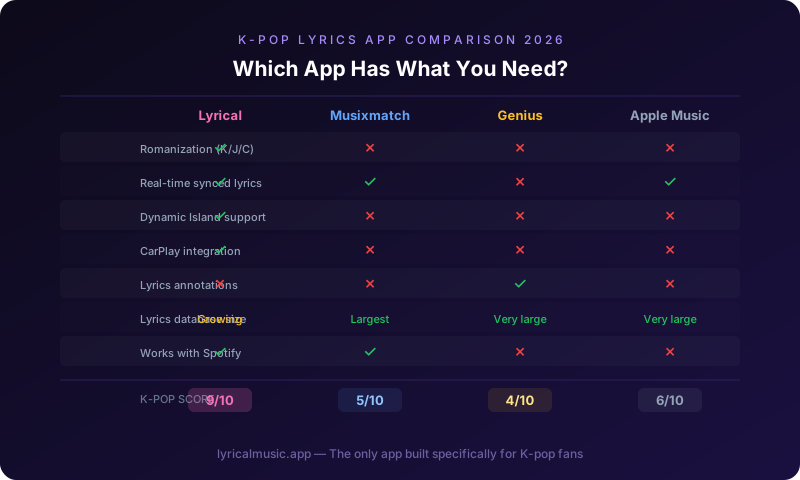
The best K-pop lyrics apps in 2026 are Lyrical, Musixmatch, and Genius. Lyrical leads for romanization and iPhone features like Dynamic Island and CarPlay. Musixmatch has the largest lyrics database but no romanization. Genius has annotations but no synced lyrics.
That is the short answer. But you probably want to know which app actually helps you sing along without switching between three different apps. You want romanized lyrics that sync with the music. You want to know which one is worth your money.
We tested every major lyrics app with K-pop songs. Here is what we found.
What Most People Get Wrong About Lyrics Apps
The biggest mistake is assuming all lyrics apps are the same. They are not. Some have massive databases but no sync. Some sync perfectly but only for Western music. Some have romanization but it is buried three menus deep.
Another mistake is using apps designed for reading lyrics, not singing along. Genius is great for understanding what lyrics mean. It is terrible for singing along in real time because the lyrics do not scroll.
The third mistake is paying for a subscription before testing the free version. Most apps have limited free tiers. Use them first. See if the app has your favorite songs. See if the romanization is accurate.
The Counterintuitive Truth About Romanization
Here is what surprised us: almost no major lyrics app has built-in romanization for K-pop. Musixmatch has translations in 60 languages but no phonetic spelling. Genius has annotations for every line but no Korean pronunciation help. Apple Music has synced lyrics but only the original Korean characters.
The apps that do have romanization are often niche, buggy, or expensive. You would think romanization would be standard for K-pop given how global the fanbase is. It is not.
This gap is why dedicated K-pop lyrics apps exist. They are not competing with Musixmatch on database size. They are winning on features K-pop fans actually need.
The Apps We Tested
Lyrical
Best for: iPhone users who want romanization and modern features
What it does well:
- Romanization built-in for Korean, Japanese, and Chinese
- Real-time synced lyrics with word-by-word highlighting
- Dynamic Island support — lyrics float while you use other apps
- CarPlay integration — lyrics on your car's display
- StandBy Mode widget — lyrics on your nightstand
- Haptic feedback pulses with the beat
- Cheap lifetime pricing ($20)
What it lacks:
- Smaller lyrics database than Musixmatch (growing fast)
- iOS only (no Android)
The emotional journey: You download it, skeptical because you have never heard of it. You play your favorite BTS song. The romanization appears automatically. You sing along without switching apps. You realize this is what you have been looking for.
Verdict: Best for serious K-pop fans who want the full iPhone feature set.
Musixmatch
Best for: Finding lyrics for obscure songs
What it does well:
- 80 million lyrics in the database
- Official partner of Spotify, Apple Music, Instagram
- Line-by-line sync for most popular songs
- Translations in 60+ languages
- Works on iOS and Android
What it lacks:
- NO romanization for Korean, Japanese, or Chinese
- Expensive subscription ($10.99/month)
- No Dynamic Island or CarPlay features
- Focused on translation, not phonetic pronunciation
The emotional journey: You download it because it is the biggest name. You search for your favorite K-pop song. You find the lyrics, but they are only in Korean characters or English translation. You cannot sing along phonetically. You keep looking.
Verdict: Best for finding lyrics, terrible for learning to sing K-pop.
Genius
Best for: Understanding what lyrics mean
What it does well:
- 115 million monthly users
- Community annotations explain references
- Artist-verified lyrics
- Strong in hip-hop and rap
What it lacks:
- NO synced lyrics — static text only
- NO romanization features
- Web-focused, not app-focused
- Lost traffic when Google started showing lyrics directly
The emotional journey: You use it to look up what a specific line means. You get lost in annotations about cultural references. You learn something interesting. You still cannot sing along because the lyrics do not scroll with the music.
Verdict: Best for lyric meanings, useless for singing along.
Dynamic Lyrics
Best for: Dynamic Island early adopters
What it does well:
- First app with Dynamic Island lyrics support
- CarPlay widget
- Spotify and Apple Music integration
What it lacks:
- Expensive subscription model
- Limited romanization
- Small lyrics database
- Reliability issues (per user reviews)
The emotional journey: You hear about Dynamic Island lyrics. You download the app that pioneered it. It works sometimes. Other times the lyrics do not load. You get frustrated.
Verdict: Innovative but inconsistent. Wait for more mature alternatives.
K-Pop Specific Apps
There are a handful of apps built specifically for K-pop: K-Pop Lyrics, HANglow, Kpop Pro. Most are poorly maintained, have limited song libraries, or charge subscription fees for basic features. They are not serious competitors to the major apps.
Feature Comparison
| Feature | Lyrical | Musixmatch | Genius | Dynamic Lyrics |
|---|---|---|---|---|
| Romanization | ✅ Yes | ❌ No | ❌ No | ⚠️ Limited |
| Synced lyrics | ✅ Yes | ✅ Yes | ❌ No | ✅ Yes |
| Dynamic Island | ✅ Yes | ❌ No | ❌ No | ✅ Yes |
| CarPlay | ✅ Yes | ❌ No | ❌ No | ✅ Yes |
| StandBy Mode | ✅ Yes | ❌ No | ❌ No | ❌ No |
| Word karaoke | ✅ Yes | ⚠️ Limited | ❌ No | ❌ No |
| Haptic feedback | ✅ Yes | ❌ No | ❌ No | ❌ No |
| Database size | Medium | 80M+ | Large | Small |
| Price | $20 lifetime | $10.99/month | Free | Subscription |
| iOS/Android | iOS only | Both | Both | iOS only |
Which App Should You Choose?
Choose Lyrical if:
- You want romanization for singing along
- You use iPhone features like Dynamic Island and CarPlay
- You prefer one-time payment over subscriptions
- K-pop and anime are your main genres
Choose Musixmatch if:
- You listen to music in many languages
- You need translations, not romanization
- You want the largest lyrics database
- You do not mind paying monthly
Choose Genius if:
- You care about lyric meanings and annotations
- You mostly listen to hip-hop and rap
- You do not need synced lyrics
Choose Dynamic Lyrics if:
- You specifically want Dynamic Island features
- You are willing to deal with reliability issues
- You do not need extensive romanization
The Specific Advice From Someone Who Has Been Through This
I tried Musixmatch first because it was the biggest name. I found my favorite songs but could not sing along because there was no romanization. I tried Genius for annotations but got frustrated that lyrics did not scroll. I tried a K-pop specific app but it crashed constantly.
What worked: finding an app built for the specific problem I had. I did not need 80 million lyrics. I needed romanization for the hundred songs I actually listen to. I needed lyrics that scrolled with the music. I needed it to work on my iPhone without switching apps.
The app that checked those boxes was not the most popular one. It was the one built for K-pop fans specifically.
Common Questions
Is romanization accurate enough for singing?
Yes. Romanization captures the sounds close enough that you will be understandable. Native speakers will notice accent differences, but you will be singing the right words with roughly correct pronunciation.
Why do some apps not have romanization?
Romanization requires additional data entry for every song. Most apps prioritize translation over phonetic spelling because translation has broader appeal. K-pop specific apps add romanization because their audience demands it.
Can I use these apps offline?
Some apps cache lyrics for offline use. Check the specific app's features. Most require internet connection for real-time sync.
Are these apps legal?
Yes. Lyrics apps license lyrics from publishers or use community-contributed databases. They are legal to use.
What if my favorite song is not in the app?
Popular K-pop songs get added quickly. Niche songs or new releases might take time. Most apps have request features. Some allow you to add lyrics manually.
Do I need to pay for a lyrics app?
Most have free tiers with limitations. Paid versions usually remove ads, add offline access, or unlock premium features. Lyrical is unusual in offering a cheap lifetime purchase instead of subscription.
The Bottom Line
The best K-pop lyrics app depends on what you need. For most K-pop fans who want to sing along, Lyrical wins on romanization, iPhone features, and price. Musixmatch wins on database size but loses on K-pop specific features. Genius wins on annotations but is not designed for singing along.
Try the free versions first. See which one has your favorite songs. See which interface feels natural. Then decide if the premium features are worth paying for.
Try Lyrical Free
Lyrical shows real-time synced lyrics with romanization for K-pop, J-pop, and C-pop. Dynamic Island, CarPlay, StandBy Mode, and word-by-word karaoke.
Download Lyrical and see why K-pop fans are switching.
*Last updated: March 2026*