iPhone Karaoke: Best Apps for Singing Along in 2026
Looking for the best karaoke app for your iPhone? We tested the top options for 2026 including Apple Music Sing, StarMaker, Yokee, and Lyrical. Here's what actually works for singing along to your favorite songs.
iPhone Karaoke: Best Apps for Singing Along in 2026
The best iPhone karaoke apps in 2026 are Apple Music Sing, Lyrical, StarMaker, and Yokee. Apple Music Sing offers official karaoke with vocal removal for Apple Music subscribers. Lyrical specializes in synced lyrics with romanization for K-pop and anime. StarMaker and Yokee provide social karaoke experiences with recording and sharing features.
That is the short answer. But you probably want to know which app actually helps you sing better, which one has the songs you want, and which one is worth paying for.
We tested every major karaoke app on iPhone. Here is what we found.
What Most People Get Wrong About iPhone Karaoke
The biggest mistake is thinking all karaoke apps are the same. They are not. Some remove vocals from any song. Some only work with specific music services. Some are social networks where you post performances. Some are private practice tools.
Another mistake is assuming free apps are good enough. Most free karaoke apps have limited song libraries, intrusive ads, or push expensive subscriptions. You often get what you pay for.
The third mistake is ignoring the lyrics quality. Badly synced lyrics, missing lines, or no romanization for foreign songs ruins the experience. The best app with bad lyrics is worse than a mediocre app with perfect lyrics.
The Counterintuitive Truth About Karaoke Apps
Here is what surprised us: the "best" karaoke app depends entirely on what you want to do. Want to post performances and get followers? You need a social app. Want to practice singing along privately? You need a lyrics app. Want official instrumental tracks? You need a music service with karaoke features.
There is no single app that does everything perfectly. The key is matching the app to your goal.
The emotional journey of finding your karaoke app: you download the popular one first, realize it does not do what you need, try three more, get frustrated, then find the one that actually fits how you want to sing.
The Apps We Tested
Apple Music Sing
Best for: Apple Music subscribers who want official karaoke features
What it does well:
- Built into Apple Music — no separate app needed
- Adjustable vocals — remove or reduce the original singer
- Real-time lyrics with beat-by-beat highlighting
- Works with millions of songs in the Apple Music catalog
- Duet mode splits lyrics for two singers
- Free with Apple Music subscription
What it lacks:
- Requires Apple Music subscription ($10.99/month)
- No romanization for K-pop, J-pop, or other foreign languages
- Limited to Apple Music catalog — no Spotify or other sources
- No social features — purely private
- No recording or sharing capabilities
The emotional journey: You open Apple Music, find the Sing feature, and realize you can finally sing along without the original vocals drowning you out. It works seamlessly. Then you try to sing a BTS song and realize there is no romanization help. You can remove the vocals, but you still cannot read the Korean lyrics.
Verdict: Best for English songs and Apple Music subscribers. Useless for K-pop fans who need romanization.
Lyrical
Best for: K-pop, anime, and J-pop fans who want to sing along accurately
What it does well:
- Real-time synced lyrics with word-by-word highlighting
- Romanization for Korean, Japanese, and Chinese
- Works with Apple Music and Spotify
- Dynamic Island support — lyrics visible while using other apps
- CarPlay integration — karaoke in your car
- StandBy Mode widget — lyrics on your nightstand
- Haptic feedback pulses with the beat
- Cheap lifetime pricing ($20)
What it lacks:
- Does not remove vocals — you sing along with the original track
- iOS only (no Android)
- Smaller lyrics database than dedicated karaoke apps
- No social features or recording
The emotional journey: You download it skeptical because you have never heard of it. You play your favorite K-pop song. The romanization appears automatically, synced perfectly with the music. You sing along without switching apps. You realize this is what you have been looking for.
Verdict: Best for singing along to foreign language music accurately. Not traditional karaoke, but better for learning lyrics.
StarMaker
Best for: Social karaoke performers who want to share their singing
What it does well:
- Massive song library with official instrumentals
- Record your performances with video
- Share to the StarMaker community
- Get followers and likes
- Duet with other users
- Vocal effects and auto-tune
- Free tier available
What it lacks:
- Expensive subscription for full features ($7.99/week or more)
- Heavy focus on social features — not great for private practice
- Limited romanization for foreign songs
- Ads in free version
- Pressure to perform for an audience
The emotional journey: You record your first performance, post it, and get some likes. It feels good. Then you realize you are spending more time worrying about camera angles and followers than actually singing. The social pressure changes the experience.
Verdict: Best for extroverts who want to perform and build a following. Not ideal for private practice.
Yokee
Best for: Casual karaoke with YouTube backing tracks
What it does well:
- Uses YouTube videos for unlimited song selection
- Record and share performances
- Simple interface
- Free version available
What it lacks:
- Relies on YouTube — songs can be removed or blocked
- Audio quality varies wildly
- No official instrumental tracks
- Ads and limited features in free version
- No romanization or advanced features
The emotional journey: You search for a song, find a YouTube karaoke version, and sing along. It works. Then the video gets taken down, or the audio quality is terrible, or the lyrics are wrong. You realize YouTube karaoke is unreliable.
Verdict: Good for casual use, terrible for serious practice. Unreliable by design.
Smule
Best for: Singing with strangers and joining global collaborations
What it does well:
- Sing duets with people around the world
- Join group performances
- Large community
- Various vocal effects
What it lacks:
- Expensive subscription model
- Limited free songs
- Focus on social over accuracy
- No romanization features
- Complicated interface
Verdict: Best for social singers who want to collaborate. Not for serious lyric learning.
Feature Comparison
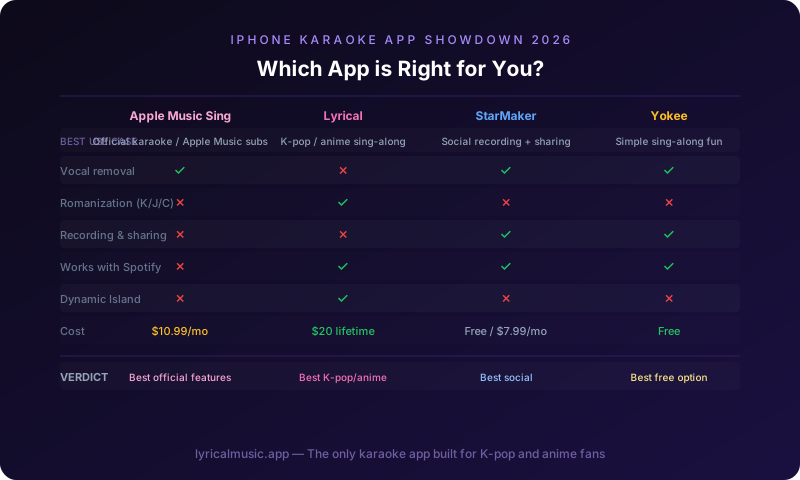
| Feature | Apple Music Sing | Lyrical | StarMaker | Yokee | Smule |
|---|---|---|---|---|---|
| Vocal removal | ✅ Yes | ❌ No | ✅ Yes | ⚠️ YouTube | ⚠️ Limited |
| Synced lyrics | ✅ Yes | ✅ Yes | ✅ Yes | ⚠️ Varies | ✅ Yes |
| Romanization | ❌ No | ✅ Yes | ❌ No | ❌ No | ❌ No |
| K-pop focus | ❌ No | ✅ Yes | ⚠️ Limited | ⚠️ Varies | ❌ No |
| Social features | ❌ No | ❌ No | ✅ Yes | ✅ Yes | ✅ Yes |
| Recording | ❌ No | ❌ No | ✅ Yes | ✅ Yes | ✅ Yes |
| Works with Spotify | ❌ No | ✅ Yes | ❌ No | ❌ No | ❌ No |
| Dynamic Island | ❌ No | ✅ Yes | ❌ No | ❌ No | ❌ No |
| CarPlay | ❌ No | ✅ Yes | ❌ No | ❌ No | ❌ No |
| Price | $10.99/mo | $20 lifetime | $7.99+/wk | Free/Ads | $7.99+/wk |
Which App Should You Choose?
Choose Apple Music Sing if:
- You already subscribe to Apple Music
- You mostly sing English songs
- You want official vocal removal
- You do not need social features
Choose Lyrical if:
- You sing K-pop, anime, or J-pop
- You need romanization to pronounce foreign lyrics
- You want synced lyrics with Spotify or Apple Music
- You use iPhone features like Dynamic Island and CarPlay
- You prefer one-time purchase over subscriptions
Choose StarMaker if:
- You want to record and share performances
- You want to build a following
- You are comfortable with weekly subscription costs
- Social validation motivates you
Choose Yokee if:
- You are casual about karaoke
- You do not mind unreliable YouTube sources
- Free is your priority
- You are not serious about practice
Choose Smule if:
- You want to sing with strangers
- Global collaboration excites you
- You can navigate complex interfaces
- You do not mind expensive subscriptions
The Specific Advice From Someone Who Has Tried Them All
I started with StarMaker because it was popular. I recorded performances, got some likes, but felt pressured to perform rather than practice. I switched to Apple Music Sing for the vocal removal, but got frustrated when I could not sing K-pop songs without romanization.
What worked: using Lyrical for practice and learning lyrics, then using Apple Music Sing for final performances once I knew the words. The romanization in Lyrical taught me how to pronounce Korean and Japanese. The vocal removal in Apple Music Sing let me test myself without the original singer.
The app that checked the most boxes was not the most popular one. It was the one built for the specific problem I had: singing foreign language songs accurately.
Common Questions About iPhone Karaoke
Can I use these apps without internet?
Some apps cache songs for offline use. Check individual app features. Most require internet for real-time lyrics and streaming.
Do I need a microphone?
Your iPhone's built-in microphone works for most apps. For better quality, use AirPods or external microphones. Some apps work better with headphones to prevent audio feedback.
Can I connect to a TV or speaker?
Yes. Use AirPlay to send audio and video to Apple TV or AirPlay-compatible speakers. This turns your iPhone into a karaoke machine for your living room.
Are these apps legal?
Yes. Karaoke apps license music or use official APIs. They are legal to use.
What about copyright when posting performances?
Apps like StarMaker and Smule have licensing agreements that cover user performances. You are generally safe posting within their platforms. Posting to external sites like YouTube may trigger copyright claims.
Can I use karaoke apps with Bluetooth speakers?
Yes, but there may be audio delay. Bluetooth adds latency that can throw off your timing. Wired connections or AirPlay work better for precise sync.
Do any apps work with both Apple Music and Spotify?
Lyrical works with both. Most other apps are limited to one service or use their own music sources.
Which app has the best audio quality?
Apple Music Sing uses official high-quality audio. StarMaker uses official instrumentals. Apps relying on YouTube (Yokee) have variable quality.
The Bottom Line
The best iPhone karaoke app depends on what you want. For official vocal removal and English songs, Apple Music Sing wins. For K-pop and anime with romanization, Lyrical is unmatched. For social performance, StarMaker leads. For casual free use, Yokee works.
Try the free versions first. See which interface feels natural. See which one has your favorite songs. Then decide if premium features are worth paying for.
Try Lyrical Free
Lyrical shows real-time synced lyrics with romanization for K-pop, anime, and more. Works with Apple Music and Spotify. Dynamic Island, CarPlay, and word-by-word karaoke mode.
Download Lyrical and start singing along accurately.
*Last updated: March 2026*