Spotify Lyrics Not Working? Here's How to Fix It (2026)
Spotify lyrics not showing up? Here's a complete troubleshooting guide for fixing missing lyrics, sync issues, and display problems on iPhone, Android, and desktop in 2026.
Spotify Lyrics Not Working? Here's How to Fix It (2026)
If Spotify lyrics are not working, try these fixes: update your Spotify app, check your internet connection, restart the app, clear cache, or use a third-party lyrics app like Lyrical as a backup. Spotify's lyrics feature depends on Musixmatch data and requires stable internet. Some songs simply do not have lyrics available yet.
That is the short answer. But if you are staring at your phone wondering why the lyrics button disappeared or why the words are not syncing with the music, you need more than a quick fix. You need to understand what is happening and how to solve it permanently.
This guide walks you through every solution, from simple restarts to alternative apps that work when Spotify does not.
What Most People Get Wrong About Spotify Lyrics
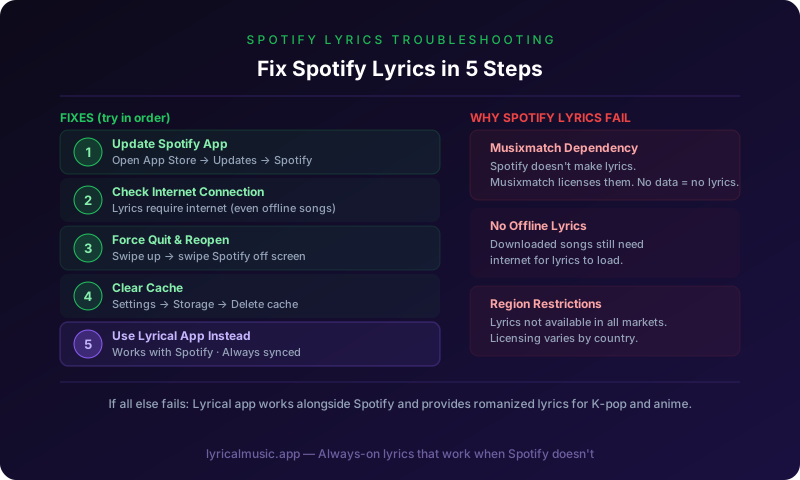
The biggest mistake is assuming Spotify creates its own lyrics. It does not. Spotify licenses lyrics from Musixmatch, a third-party service. If Musixmatch does not have lyrics for a song, Spotify cannot show them. This is why popular songs have lyrics immediately while niche tracks wait weeks or months.
Another mistake is thinking lyrics work offline. They do not. Spotify lyrics require internet connection to fetch data from Musixmatch's servers. Even if you have downloaded the song for offline listening, lyrics need connectivity.
The third mistake is not knowing about the regional restrictions. Lyrics availability varies by country due to licensing agreements. A song might have lyrics in the US but not in Japan, or vice versa.
The Counterintuitive Truth About Spotify Lyrics
Here is what surprises people: Spotify's lyrics feature is actually less reliable than dedicated lyrics apps. Because Spotify is a music streaming service first and a lyrics display second, lyrics are an afterthought in their infrastructure.
Dedicated lyrics apps like Musixmatch (the source of Spotify's lyrics) or Lyrical prioritize lyrics display. They update faster, sync more accurately, and work more consistently.
The emotional journey of dealing with Spotify lyrics: frustration when they do not work, relief when you find a fix, then frustration again when it breaks next week. Many users eventually switch to dedicated lyrics apps for reliability.
Common Problems and Solutions
Problem: Lyrics button is missing
Solution 1: Update Spotify. The lyrics feature requires recent versions. Go to App Store (iPhone) or Google Play (Android) and check for updates.
Solution 2: Check if the song has lyrics. Not all songs do. Try a popular recent release — if lyrics appear there, the feature works. Your original song might just not have lyrics available.
Solution 3: Change regions. Some countries have limited lyrics access. A VPN might help, though this violates Spotify's terms of service.
Solution 4: Use a third-party app. Lyrical displays lyrics for Spotify songs independently. Download it as a backup.
Problem: Lyrics are not syncing
Solution 1: Check your internet connection. Lyrics sync requires stable data. Switch from WiFi to cellular or vice versa.
Solution 2: Restart Spotify. Force close the app and reopen it. This refreshes the connection to Musixmatch.
Solution 3: Clear Spotify cache. Go to Settings > Storage > Clear Cache. This removes corrupted data that might cause sync issues.
Solution 4: The lyrics might be wrong in Musixmatch's database. Community-contributed lyrics sometimes have sync errors. Report incorrect timing through Spotify's feedback option.
Problem: Lyrics disappeared mid-song
Solution 1: Your internet connection dropped. Lyrics require constant data. Check your signal strength.
Solution 2: Spotify lost connection to Musixmatch. Restart the app to re-establish the link.
Solution 3: The song changed metadata mid-playback. This confuses the lyrics system. Restart the song.
Problem: Lyrics show wrong language
Solution 1: Check your Spotify language settings. Go to Settings > Language and ensure it matches your preference.
Solution 2: The song might have lyrics in the original language only. Not all songs have translations.
Solution 3: Musixmatch might not have translation data for that song yet. Popular songs get translations first.
Problem: Lyrics work on desktop but not mobile
Solution 1: Mobile and desktop apps update separately. Ensure both are on the latest version.
Solution 2: Mobile apps sometimes have features disabled for performance reasons. Check Spotify's official feature availability list.
Solution 3: Your mobile device might be too old. Lyrics require recent iOS or Android versions.
Advanced Troubleshooting
Clear Spotify Cache (iPhone)
1. Open Spotify
2. Go to Settings (gear icon)
3. Scroll to Storage
4. Tap Clear Cache
5. Restart Spotify
Clear Spotify Cache (Android)
1. Open Spotify
2. Go to Settings
3. Scroll to Storage
4. Tap Delete Cache
5. Restart Spotify
Reinstall Spotify
If clearing cache does not work, try a full reinstall:
1. Delete Spotify from your device
2. Restart your phone
3. Download Spotify again from App Store or Google Play
4. Log in and test lyrics
Check Spotify Server Status
Sometimes the problem is not you — it is Spotify. Check Downdetector or Spotify's Twitter for outage reports. If servers are down, wait for them to fix it.
Alternative: Use Lyrical When Spotify Fails
When Spotify lyrics do not work, Lyrical provides a reliable backup:
How it works: Lyrical detects what is playing in Spotify and displays lyrics independently. You get synced lyrics even when Spotify's native feature fails.
Advantages over Spotify lyrics:
- More reliable sync
- Romanization for K-pop and anime
- Dynamic Island support
- CarPlay integration
- Works even when Spotify's servers have issues
How to use:
1. Start playing music in Spotify
2. Open Lyrical
3. The app detects your music and shows lyrics
4. Lyrics highlight in real-time as the song plays
The specific thing Lyrical does: it treats lyrics as the main feature, not an afterthought. When Spotify's lyrics break, Lyrical keeps working.
Preventing Future Problems
Keep Spotify updated: Enable automatic updates so you always have the latest version.
Maintain stable internet: Lyrics need connectivity. Use WiFi when possible for reliability.
Have a backup app: Download Lyrical or Musixmatch as a backup for when Spotify fails.
Report missing lyrics: Use Spotify's feedback to report songs without lyrics. This helps them prioritize adding data.
Be patient with new releases: Lyrics for new songs take time to add. Popular songs get priority.
Common Questions About Spotify Lyrics
Why do some songs not have lyrics?
Spotify licenses lyrics from Musixmatch. If Musixmatch does not have lyrics for a song, Spotify cannot display them. Niche songs, new releases, and non-English music often wait longer for lyrics.
Do I need Spotify Premium for lyrics?
No. Lyrics work on both free and Premium tiers. However, Premium users sometimes get features first.
Why do lyrics work for my friend but not me?
Regional differences, app versions, or device differences. Ensure you are both on the latest Spotify version. Some features roll out gradually to different users.
Can I add lyrics myself?
Not directly to Spotify. Musixmatch accepts community contributions. Create an account there and add lyrics for songs you know.
Why did lyrics disappear after an update?
Sometimes updates break features temporarily. Check Spotify's support forums. Usually fixes come quickly.
Are lyrics available offline?
No. Lyrics require internet connection to fetch from Musixmatch's servers, even if the song itself is downloaded.
Why are the lyrics wrong?
Musixmatch relies on community contributions. Errors happen. Report incorrect lyrics through Spotify's feedback system.
Is there a way to see lyrics on older Spotify versions?
No. Lyrics require recent app versions. Update Spotify to access the feature.
The Bottom Line
Spotify lyrics are convenient when they work, frustrating when they do not. The fixes are usually simple: update, restart, check internet. When Spotify fails, third-party apps like Lyrical provide reliable alternatives.
The 3am frustration of wanting to sing along but seeing no lyrics button? There is a solution. Try the fixes above. Have a backup app ready. Keep singing.
Try Lyrical as Your Backup
Lyrical shows real-time synced lyrics for Spotify and Apple Music. Works when Spotify's native lyrics fail. Romanization for K-pop and anime included.
Download Lyrical and never miss lyrics again.
*Last updated: March 2026*