Best Free Karaoke Apps for iPhone (2026): Top Picks Compared
Discover the best free karaoke apps for iPhone in 2026. Compare features, libraries, and limitations to find your perfect singing companion.
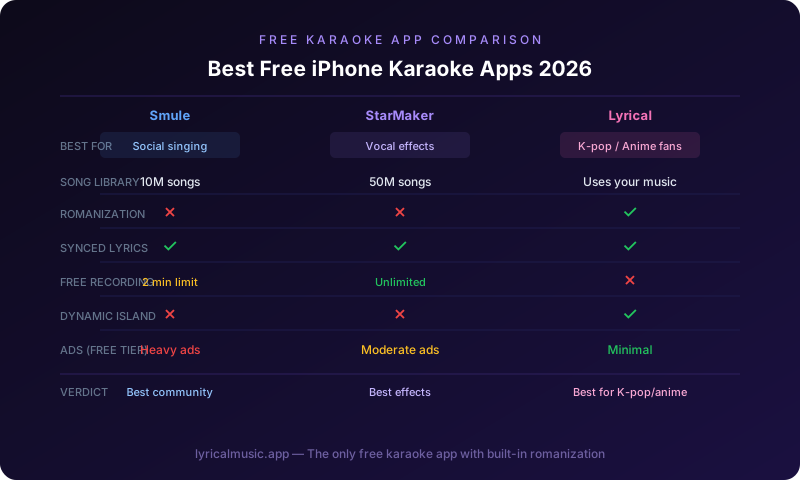
The best free karaoke apps for iPhone in 2026 are Smule for social singing, StarMaker for vocal effects, and Lyrical for lyrics-focused karaoke with Apple Music or Spotify integration. Smule offers the largest free song library but limits recording time. StarMaker provides professional vocal effects at no cost but includes ads. Lyrical delivers synced lyrics and romanization for K-pop and anime fans with a generous free tier.
Karaoke has evolved far beyond crowded bars with outdated songbooks. Your iPhone now puts thousands of backing tracks, vocal effects, and social features in your pocket. But not all karaoke apps are created equal — especially when you're looking for genuinely free options. This guide cuts through marketing claims to reveal what each popular app actually offers without payment, their limitations, and which one fits your singing style.
What to Expect from Free Karaoke Apps
Before diving into specific apps, understand the reality of "free" karaoke on iPhone.
Common Free Tier Limitations
Most karaoke apps use freemium models. The free version typically includes:
- Access to a limited song library (often 10-30% of total catalog)
- Basic recording capabilities
- Standard audio quality
- Advertisements between songs
- Limited vocal effects
What you usually won't get for free:
- Full song library access
- High-quality audio export
- Advanced vocal effects
- Ad-free experience
- Unlimited recording time
Song Library Realities
No free karaoke app offers every song. Licensing agreements determine availability, and major hits often require premium subscriptions. Free tiers typically include:
- Older songs (5+ years old)
- Less popular tracks
- Public domain songs
- User-uploaded content (quality varies)
Audio Quality Considerations
Free versions often compress audio to reduce server costs. This matters less for casual singing but becomes noticeable when recording or using headphones. Premium tiers usually offer uncompressed or higher-bitrate audio.
Top Free Karaoke Apps Compared
Here are the leading free karaoke apps for iPhone, evaluated honestly.
1. Smule — Best for Social Singing
Overview: The largest karaoke community with millions of users worldwide. Smule transformed mobile karaoke into a social experience.
Free Tier Includes:
- Access to approximately 10 million songs (limited selection rotates monthly)
- Solo recording up to 2 minutes per song
- Duet and group singing with other users
- Basic audio effects (reverb, echo)
- Social features (following, commenting, sharing)
- Join other users' performances
Free Tier Limitations:
- Cannot choose specific songs (rotating selection only)
- Recording time capped at 2 minutes
- Audio quality limited to 128kbps
- Advertisements between performances
- No offline access
- Cannot download recordings
Premium Upgrade ($7.99/month):
- Full song library access
- Unlimited recording time
- High-quality audio (256kbps)
- Advanced vocal effects
- Ad-free experience
- Download and share recordings
Best For: Singers who want community, duets, and social features. The free rotation system encourages discovering new songs rather than singing the same favorites repeatedly.
Download: Smule on App Store
2. StarMaker — Best for Vocal Effects
Overview: Professional-grade vocal processing in a free package. StarMaker emphasizes sounding good over raw performance.
Free Tier Includes:
- Library of 2+ million songs
- Professional vocal effects (autotune, harmony, reverb)
- Video recording with filters
- Pitch correction
- Social sharing features
- Daily free song credits
Free Tier Limitations:
- Limited daily song credits (usually 3-5 songs)
- Watermark on video recordings
- Standard audio quality
- Advertisements
- Some premium effects locked
- Limited offline songs
Premium Upgrade ($8.99/month):
- Unlimited songs
- Remove watermarks
- All vocal effects unlocked
- High-quality audio and video
- Ad-free experience
- VIP badge and profile features
Best For: Singers who want to sound polished and professional. The vocal effects genuinely improve your sound, making this ideal for sharing on social media.
Download: StarMaker on App Store
3. Lyrical — Best for Lyrics-Focused Karaoke
Overview: A lyrics-first app that turns your existing music subscriptions into karaoke experiences. Unique focus on romanization for K-pop and anime songs.
Free Tier Includes:
- Synced lyrics for Apple Music and Spotify
- Romanization for Korean, Japanese, and Chinese songs
- Dynamic Island and Lock Screen widgets
- Basic karaoke mode (lyrics highlighting)
- CarPlay support
- Word-by-word sync
Free Tier Limitations:
- Requires Apple Music or Spotify subscription for music playback
- Limited offline lyrics downloads
- Basic vocal recording (no backing track isolation)
- Standard lyric display themes
- Some advanced features require premium
Premium Upgrade ($2.99/month or $19.99 lifetime):
- Unlimited offline lyrics
- Advanced karaoke modes
- Custom themes and fonts
- Enhanced romanization options
- Priority support
Best For: K-pop fans, anime enthusiasts, and anyone who wants to sing along to their existing music library with proper lyrics and romanization. The lifetime pricing is notably affordable.
Download: Lyrical on App Store
4. Yokee — Best for YouTube Integration
Overview: Leverages YouTube's massive catalog for karaoke tracks. If a song exists on YouTube with karaoke backing, Yokee can probably access it.
Free Tier Includes:
- Access to YouTube karaoke videos
- Basic recording functionality
- Simple vocal effects
- Social sharing
- Playlist creation
Free Tier Limitations:
- Relies on YouTube content (quality varies)
- Advertisements from both Yokee and YouTube
- Cannot download recordings
- Limited offline functionality
- Audio quality depends on YouTube source
- Songs may be removed due to copyright
Premium Upgrade ($4.99/month):
- Ad-free experience
- Enhanced recording features
- Better audio quality
- Priority access to new features
Best For: Users who want access to obscure songs not found in other apps. The YouTube integration means if someone uploaded a karaoke version, you can probably sing it.
Download: Yokee on App Store
5. Sing Karaoke by Stingray — Best for Official Tracks
Overview: Professional karaoke company Stingray offers their catalog in app form. Focus on official, high-quality backing tracks.
Free Tier Includes:
- Curated selection of popular songs
- Official Stingray backing tracks
- Basic recording
- Standard audio effects
- Limited daily plays
Free Tier Limitations:
- Very limited free song selection (rotates weekly)
- Only 2-3 free songs per day
- No offline access
- Advertisements
- Cannot save recordings
Premium Upgrade ($9.99/month):
- Full catalog access (50,000+ songs)
- Unlimited plays
- High-quality audio
- Recording and sharing
- Ad-free experience
Best For: Users who prioritize audio quality and official backing tracks over quantity. The free tier is very limited, but the premium offering is professional-grade.
Download: Stingray Karaoke on App Store
Feature Comparison Table
| Feature | Smule | StarMaker | Lyrical | Yokee | Stingray |
|---|---|---|---|---|---|
| Free Songs | 10M+ (rotating) | 2M+ (limited daily) | Unlimited* | YouTube catalog | Very limited |
| Recording | 2 min limit | Unlimited | Basic | Basic | No |
| Vocal Effects | Basic | Professional | None | Basic | Basic |
| Video | Yes | Yes | No | Yes | No |
| Social Features | Excellent | Good | Limited | Basic | None |
| Audio Quality | 128kbps | Standard | High | Varies | High |
| Ads | Yes | Yes | Minimal | Yes | Yes |
| Offline | No | Limited | Limited | No | No |
| Romanization | No | No | Yes | No | No |
*Requires Apple Music or Spotify subscription for music playback
Specialized Free Karaoke Options
Beyond general-purpose apps, several free options serve specific niches.
For K-Pop Fans: MoMo
A community-driven app focused entirely on K-pop karaoke. Free tier includes popular group songs with official instrumental tracks. The community uploads romanized lyrics and timing data. Limited selection but passionate user base.
Best For: Dedicated K-pop fans who want group-specific content.
For Classical/Traditional: Red Karaoke
Offers classical, jazz, and traditional songs often missing from mainstream apps. Free tier is limited but unique. If you want to sing opera arias or jazz standards, this is your best free option.
Best For: Classical singers and those seeking non-pop repertoire.
For Kids: Kids Karaoke
Curated, child-friendly song selection with parental controls. Free tier includes nursery rhymes and Disney songs. No social features, making it safer for young users.
Best For: Parents seeking appropriate karaoke for children.
Maximizing Free Karaoke Experiences
Get the most from free tiers with these strategies.
Rotate Between Apps
No single free app offers everything. Many experienced users maintain 3-4 karaoke apps:
- Smule for social features and duets
- StarMaker when they want vocal effects
- Lyrical for their own music library
- Yokee for obscure songs
This rotation maximizes free content while avoiding the limitations of any single app.
Time Your Usage
Free tiers often reset daily or weekly:
- Smule rotates free songs weekly (check Sundays)
- StarMaker gives daily credits (resets at midnight)
- Stingray offers new free songs weekly
Plan your singing sessions around these cycles.
Use External Microphones
Free apps don't include hardware, but your audio quality improves dramatically with:
- Lightning or USB-C microphones
- Bluetooth karaoke microphones
- Headphones with built-in mics
Even budget external mics ($20-40) outperform iPhone built-in microphones for singing.
Record Screen for Saves
Most free apps prevent downloading recordings. Workaround: use iOS Screen Recording:
1. Add Screen Recording to Control Center (Settings > Control Center)
2. Start recording before your performance
3. Stop recording after finishing
4. Video saves to Photos app
This captures both audio and video without premium upgrades.
When to Consider Premium
Free tiers serve casual users well, but consider upgrading if you:
- Sing more than 3-4 times per week
- Want to build a recording collection
- Need specific songs for performances
- Care about audio quality for sharing
- Use karaoke professionally (teaching, hosting)
The break-even point varies by app, but heavy users typically find premium subscriptions worthwhile within a month or two.
Privacy Considerations
Karaoke apps collect significant data:
- Voice recordings
- Usage patterns
- Social connections
- Location data
Review privacy settings in each app:
- Limit public sharing of recordings
- Disable location services if unnecessary
- Check what data the app collects
- Review terms of service for content ownership
Some apps claim rights to your recordings in their terms of service. Read carefully if you plan to post original content.
Frequently Asked Questions
Can I really get good karaoke for free?
Yes, but with limitations. Free tiers are genuinely functional for casual singing. The main restrictions are song selection, recording capabilities, and audio quality. For occasional karaoke sessions, free versions work well.
Why do karaoke apps have such limited free libraries?
Music licensing is expensive. Karaoke apps pay royalties for every song in their catalog. Free tiers offer enough content to demonstrate value while encouraging upgrades that fund licensing costs.
Can I use karaoke apps without internet?
Most require internet for streaming songs. Some offer limited offline functionality in free tiers, but generally you'll need connectivity. Download your favorite songs when on WiFi to save mobile data.
Are karaoke apps safe for kids?
Most have social features that expose users to strangers. For children, look for apps with parental controls or disable social features. Kids Karaoke and similar child-focused apps are safer options.
Can I connect karaoke apps to my TV?
Yes, via AirPlay or screen mirroring:
1. Connect iPhone and TV to same WiFi
2. Open Control Center
3. Tap Screen Mirroring
4. Select your TV
5. Open karaoke app
This transforms your living room into a karaoke venue using free apps.
Do karaoke apps work with Bluetooth speakers?
Absolutely. Pair your Bluetooth speaker or soundbar, and audio routes through it. This significantly improves the experience over iPhone built-in speakers. Most karaoke apps work seamlessly with Bluetooth audio.
The Bottom Line
Free karaoke apps deliver genuine value in 2026. While premium subscriptions unlock the full experience, casual singers can enjoy hours of entertainment without spending anything.
Our recommendations:
- Start with Smule if you want community and duets
- Try StarMaker if vocal polish matters most
- Download Lyrical if you sing along to your own music library, especially K-pop or anime
- Keep Yokee as a backup for obscure songs
The best karaoke app is the one you'll actually use. Download a few, test their free tiers, and see which interface and library resonate with your singing style.
Ready to start singing? Download Lyrical for free lyrics-focused karaoke with romanization, Dynamic Island support, and CarPlay integration. Perfect for K-pop and anime fans.
*Related guides: iPhone Karaoke App Guide • How to Sing K-Pop Songs • CarPlay Lyrics App*